Not a Smartphone, but Smart Enough
I'm on day 2 of my switch from my Kyocera 7135 (he's dead, Jim) to the Samsung U740 Black Phone (Verizon Wireless). Let me say that, for its size, it is packed with features.

I'm on day 2 of my switch from my Kyocera 7135 (he's dead, Jim) to the Samsung U740 Black Phone (Verizon Wireless). Let me say that, for its size, it is packed with features.

The IO staff route calls, book appointments, handle mail, create mailings while at the same time offering modest rates for premium office space for hourly, daily, weekly and monthly lease.
Part of the challenge in using a service like IO is shifting one's thinking from the traditional to the innovative. For me, that meant the 4 months it took for me to realize that I could set up my cellphone to ring over automatically to my staff at IO if I wasn't answering.
They've bailed me out in crises (mother's death, father's grave illness and husband's emergency hospitalization) allowing me to keep my business rolling rather than being forced to close up shop.
Love the book, Working from Home, by Paul and Sarah Edwards. It's a must for people who run SOHO's (small offices/home offices). Here's an interesting article on virtual office service uses you might also enjoy.

 Now, before the "work-life balance" wonks get themselves into a lather, it's about choice and what works rather than rigidly adhering to a system that doesn't. I do my best, creative thinking late at night and love to crash (side-by-side, laptops at the ready) with Garland in front of the TV to watch The Daily Show and the Colbert Report (and yes, we have actually IM'ed each other during the show--so we don't talk over Jon or Stephen...and stop snickering...you've got your own brand of weirdness, I'll wager).
I've been here and there with regard to VOIP/Internet telephony. At one time, thinking that it was very very cool (read: inexpensive) thing, I signed right up.
And then the worries began.
Mostly, my issue was bandwidth: I was using Vonage on a Comcast Cable Internet line. Late in the afternoon and on weekends, there would be periods of low service--kids were getting home from school or waking up on the weekends to use the Internet. The cable company just didn't have the bandwidth I needed to prevent the poor quality of service that I experienced.
Also, there was a feature I needed that I couldn't get: the ability to turn off call waiting, preventing the annoying "BOOP!" during client calls that came into my line. I could turn off the service on outgoing calls and I could turn the service off completely. But I couldn't turn it off for a single in-coming call. This was important to my as I charge a significant hourly rate and my clients wanted to speak to my without interruption.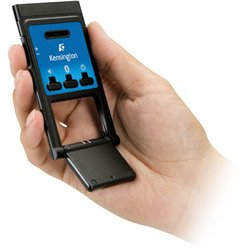
It won't replace my cellphone, but the VO200 is state of the art cool.
Cheers!
Lalita
Do you have a disaster plan? Given that we in the Northern Hemisphere are just entering hurricane and tornado season, we would do well to know what to do. Write a brief (you know how much I love working from one page) plan, including medical other disasters, give it to a trusted party and then practice.
However, there are those disasters that are entirely personal, like a very sick parent, partner or child. Do you know how to keep your business running or will your business run out of gas?
Some tips for your consideration:
Don't wait, hoping that everything will be a box of kittens the rest of your business days. This is something to get on top of.
Cheers!
I'm writing this from the public computer in the ICU waiting room in Lafayette, Indiana, about an hour's drive from my home in Indianapolis. Got a call this afternoon from my brother, Perry, the cop. That tone of voice was unmistakable--like the voice I heard two years ago that told me to get home right away and break whatever land-speed records it took to get there. This was another call like that. My Dad had been admitted, unconscious, to the ER with, what they feared was a stroke.
What really worked, amidst the flurry of packing (I think I put out food for the cat--yeah, she's taken care of...) was the simple stuff I did that put my business "on hold" temporarily. Here's the scoop...
I use a tele-secretary and virtual office service, Intelligent Office. They manage my phones when I'm away for vacations or on business, giving a personal "face" to my callers (who love Anna, by the way). Here, they're telling callers that I'm out for family business and, if I need them to, I can make a call to them and have them cancel or re-schedule my appointments. Letting them know I was going to be out for a family emergency, they will appropriately and professionally give the people I authorize more or less information. When my mother was hospitalized and passed away, they did things for my business I didn't even think to ask for. I just told them what was happening and they did the rest.
My calendar is online, so the people at Intelligent office can help manage my calendar. This is a simple function that's included on Microsoft Outlook. Remind me and I'll provide some screenshots so you'll know how to do this on Office 2003 (until then, here are the instructions for how to do it on Office 7). Here at the hospital, I can check appointments and figure out which I can handle by teleconference when Dad can see the light at the edge of the woods and which ones I need to re-schedule.
Contacts. Gotta love 'em. Also, gotta be able to find 'em. In additional to Outlook (into which I me AOL email into--a special mailbox on Outlook separate from my company email so I can read it all in one spot...and no stuff outta any of you for still having that email address. It was my first and I'm sentimental), I use the Accucard service bundled with my CardScan Business Card Scanner. When I get a new business card, into the card scanner it goes, then it synchs with Outlook seamlessly. Occasionally, it sends a friendly greeting to the people on my list, asking them to update their contact information if needed and synchs with Outlook again. The important part is that there is an online copy of my Outlook contact list I can access, say from the Home Hospital ICU waiting room.
There's more, but what's important is that I can now focus on "that which matters most," my Dad (doing much better now than when they broke down his door to collect him).
More soon!
Cheers,
Lalita
Nicely done spoof.
I think that marketing is one of those things we aren't doing as well as we could. I've had clients who have created a web presence with no thought to how well their webworks carried their message. I use CardScan Executive Business Card Scanner (love it!) and am astounded, for example, by how little thought people put into determining whether their logos, colors and designs fax and scan (or turn into "mud").
One-off actions won't work.
Cheers,
Lalita
As you know, I love my laptop (and any other gadget within five feet of me). Love it. However, last year, it got clobbered with a hijacker virus. It was terrible. I'll spare you the details of what it took to get it taken care of (it involved the sacrifice of some chickens), but in the process, I discovered a great free service. TrendMicro, which offers PC-Cillin also offers a very in-depth virus, grayware and malware scanner called PC HouseCall. It takes about an hour to run (so go get a bagel), finds everything and fixes it.
Give it a try
Cheers,
Lalita
Neatness makes my head hurt. Really. Turn on the TV and you can see show after show wherein an "organizer" will show up and begin the military march towards organization. Too many nick knacks? They've gotta go? Old paintings that remind you of a former, more creative time? History. What I initially found so unnerving is how they would whisk the home or business owner out of the scene of the crime and then, when they returned, they would have a beautiful new space...and be left there to try to get something done based on what someone else thought was workable.
Jeremy Caplan, in Time magazine article "Messy is the New Neat" says is plainly: "neatness is overrated."
I once had an organizer attach herself to me at a gathering. She asked me about the piles and clutter which, according to her, must be busying-up my space. Didn't have any. Then she went to work, peppering me with questions about where I may be accumulating "stuff" I didn't need. Finally, after several interminable minutes, she pounced: "Icons! Your clutter is in your computer!"
Rather than asking me if what I was doing worked, she started with the assumption that it simply couldn't...and then began offering her services to me in earnest. I found myself blinking at her over my raised soda and lime, trying to remember the quickest way to get my coat and head to the door.
Truth is, I've been a neatness Nazi with my husband, Garland: I just didn't like how he worked. In an early fit of newlywed togetherness, I'd insisted that we share a home office. That lasted about 2 months before his piles of stuff began their blob-like trek towards my shrinking corner of the room. That stuff was alive, I swear it.
On the other hand, I'd been the training partner of another consultant, Rick. He was notorious for only working on one thing at a time and having only those things he needed immediately on his desk. We despised him. Fast forward and there I was, eyeing Garland's stuff like it was a disease.
Looking with an eye towards workability, Garland's way of working works for him, just as my desktop full of icons works for me and Rick's polished desk worked for him.
Where did we get it that there was one way to organize? Peering into Garland's office, there is a logic to the piles that take up every corner of his space. He's crammed in his electric train run, tools, a bookcase that's full, two desks, a file cabinet and then there's the closet. He seems to defy my every attempt to straighten it up, but talks about "getting it together" almost every day.
It's just how he works.
There was a time when organization was considered a sign of an organized, disciplined mind. Clutter on the desk: clutter in the mind. Not so. Moderate mess is an indicator of nothing important about a person's character. Note: I said moderate. I'd been asked to help a woman from my hometown with a criminally messy house (yes, the police were involved) -- it wasn't safe for her or her small children and was an unfortunate sign of a serious mental condition. We threw most of what she owned away (it was all irretrievably soiled). That's something altogether different...and frightening.
People don't think the same way and they don't organize the same way. Me? I think in parallel, keeping several projects going at one time. Others, like Garland or Rick, may keep several things out, but only work on one at a time.
Caplan talks about effectiveness and how well people perform. Banish, the article suggests, the two hours a day straightening up. Use that time, instead, to be with family or advance your business or career. Authors Eric Abrahamson and David Freedman point to an example of serendipitous dot-connecting through paper desk clutter that lead to a Nobel prize winning scientist seeing a connection between cells and hormones. Their book, A Perfect Mess: The Hidden Benefits of Disorder--How Crammed Closets, Cluttered Offices, and On-the-Fly Planning Make the World a Better Place touts the benefits of relaxing schedules, foregoing compulsive filing, making friends with laptop clutter and, generally making peace with clutter.
I'm not a fan of one size clothing or solutions. If you love to straighten and it energizes you, allowing you time to think problems through in new ways -- have at it. If it becomes one more thing on your "to do" list, consider dropping it.
Listen Now: 17 minutes, 17 seconds
Laptop Thefts of Note:
Thefts Stats:
In 2003, the Safeware Company reported that 600.000 laptops are stolen annually. The Gartner Group reports a 1 in 10 chance of being a victim of laptop theft. The FBI reports that the chances of you getting your laptop back are a dismal 3 in 100!
Key Areas of Day-to-Day Vulnerability:
Keep Your Computer Safe
 . Use it when you're at a cyber cafe (even if you don't plan on leaving your computer, when you're at a conference (don't believe them when they say your stuff is safe) and when you have to leave your computer in your hotel room.


